Full Comparison

Best 5 Typeform Alternatives in 2026

Escape response limit extortion and separate tool friction. The best Typeform alternatives for lead generation, customer feedback, and business forms that actually qualify prospects.

The shortlist

5 Best Typeform Alternatives in 2026 (Unlimited Submissions & Lead Qualification)

Jovan Stojanovic

Jovan Stojanovic · Founder & CEO, ROASForm

Updated July 2026 · 15 min read

Jovan Stojanovic is the founder of ROASForm. Before building the highest-converting form and calendar system for agencies and sales teams, he scaled his sales agency to ~$50M.

Typeform is the tool that made online forms feel human. It pioneered the conversational, one-question-at-a-time experience, and its beautiful, on-brand design set the standard that most modern form builders still chase. If you want a survey or a feedback form that people actually enjoy filling out, Typeform’s UX is genuinely best-in-class — and the brand is well known and trusted enough that respondents rarely hesitate to hit submit.

So why look for an alternative? Because what makes Typeform great for surveys makes it awkward for lead generation. It charges per response, not per form, so the better your campaigns perform, the more you pay — and eventually your forms simply stop accepting submissions. It has no native calendar booking, so you still need Calendly and a Zapier automation to get a call on the books. And it has no lead qualification, so every tire-kicker who fills out your form lands in your pipeline alongside your best prospects. For a marketing or sales team running paid traffic, those three gaps add up fast.

This guide breaks down exactly where Typeform’s pricing and feature gaps hurt lead-gen teams, then ranks the 5 best Typeform alternatives for 2026 — starting with the one built specifically to capture, qualify, and book leads in a single flow.

First, the pricing, because it’s the core problem. Typeform charges you per response, not per form. On the free plan you get just 10 responses per month across all your forms combined. The $39/mo Basic plan bumps that to 100 responses. The $79/mo Plus plan gets you 1,000. And here is the part that stings the most — when you hit your cap, your forms do not slow down or show a warning. They immediately stop accepting submissions with zero grace period, and every lead that tries to fill out your form after that sees a “form closed” message. Those leads are gone forever.

For a business running ad campaigns, that response limit is not an inconvenience. It is an outage. You have paid for the traffic. The prospect clicked, started filling out the form — and hit a wall because Typeform decided your plan tier was not enough.

If you are tired of paying premium prices for artificial limits, or frustrated with beautiful forms that dump unqualified tire-kickers into your CRM, here are the 5 best Typeform alternatives that actually help you qualify leads and book calls efficiently.

Best Typeform alternative
ROASForm logo1

ROASForm — Best for Lead Generation & Qualified Call Booking

An integrated form and calendar system that captures, qualifies, and books leads in one flow — no separate tools or response limits.

Pros

  • Unlimited submissions on paid plans — flat rate, no per-response fees, ever
  • Built-in calendar booking — no separate scheduling tool required
  • Lead qualification logic filters out tire-kickers before they book
  • Syncs with GoHighLevel, Close, HubSpot, and all major CRMs
  • Built-in funnel analytics: completion rates, drop-off points, booked calls
  • Split testing included on every plan to optimize for actual conversions

Cons

  • Focused on lead generation rather than general surveys or feedback forms

💰 Price: Free Forever plan (50 submissions/mo, all features). $99/mo flat for unlimited submissions.

Try ROASForm free

ROASForm solves Typeform’s two core problems at once: response limits and separate tool friction. Instead of paying per lead while juggling multiple subscriptions, ROASForm lets you capture, qualify, and book prospects in a single conversion-optimized flow.

No need to connect Typeform + Calendly + Zapier. Everything happens in one place. Conditional logic shows relevant questions based on earlier answers. Disqualification rules filter out tire-kickers before they ever see your calendar. And when a prospect qualifies, they can book directly without leaving the form experience.

ROASForm
ROASForm’s drag-and-drop form builder — capture, qualify, and book leads in one conversion-optimized flow.

Built specifically for lead generation and call booking, ROASForm syncs with GoHighLevel, Close, HubSpot, and all the major CRMs — so qualified leads land in your pipeline automatically, ready for follow-up.

Who it’s for: sales teams, agencies, marketers, coaches, consultants, and course creators — anyone running paid traffic or outreach who needs more than a pretty form. If your goal is qualified, booked calls (not just collected responses), and you’re tired of Typeform’s response caps and stitching together Calendly and Zapier to make it all work, ROASForm is built for exactly that.

Typeform logo2

Typeform — Beautiful forms with expensive response limits

The original conversational form builder with stunning UX — now hampered by response limit extortion and integration gaps.

Pros

  • Beautiful, engaging form experience that feels conversational
  • Strong brand recognition and user trust
  • 300+ integrations (though many require Zapier)
  • Advanced logic and branching on higher plans
  • Drop-off analytics on Business plan and above

Cons

  • Free plan: just 10 responses/mo across all your forms
  • Basic ($39/mo): only 100 responses — a busy week can exhaust this
  • Forms stop cold when you hit the cap — no grace period, lost leads
  • No native calendar booking — requires Calendly + Zapier workflows
  • No native A/B / split testing — you must build and split variants manually
  • Response limits apply account-wide, not per form
  • Drop-off analytics locked to the Business plan ($129/mo)

💰 Price: Free: 10 responses/mo. Basic $39/mo: 100 responses. Plus $79/mo: 1,000 responses. Business $129/mo: 10,000 responses.

Typeform pioneered conversational forms and the product experience is genuinely excellent. But in 2026, the pricing model has become the story — and it is not a good one.

Typeform's conversational form UI showing a single-question-at-a-time email capture form
Typeform's signature one-question-at-a-time form experience.

Typeform’s Pricing Plans and Response Limits (2026)

Here is exactly what each Typeform plan costs and how many responses you actually get. These are the monthly billing prices for each plan.

PlanMonthly PriceResponses/moSeats
Free$0101
Basic$39/mo1001
Plus$79/mo1,0003
Business$129/mo10,0005
EnterpriseCustom50,000+Unlimited

Important: these response limits apply across your entire account, not per individual form. If you have a contact form, a feedback survey, and an event registration form all running at the same time, they all share a single monthly pool. Three active forms on the Basic plan means you have about 33 responses per form before things shut down.

What actually happens when you hit the limit

This is the part Typeform does not advertise prominently. When your account hits its monthly response cap, your forms do not send a warning or slow down. They immediately switch to private mode and display a “This form is now closed” message to anyone who tries to open them.

The responses lost after that point are gone permanently — they are never recorded anywhere. There is no grace period. There is no “you have 5 responses left” countdown. You go from collecting leads to turning them away with no transition.

One widely cited case: a marketer sent an email campaign to 15,000 subscribers. Within minutes, Typeform sent a notification that the response limit had been hit — but not before an unknown number of subscribers had already seen a closed form instead of being able to submit. Those are real people, real potential customers, real revenue lost.

The upgrade math is brutal

Consider a realistic scenario: your business runs two lead capture forms and a customer feedback survey. You are generating decent traffic — maybe 150-200 form submissions a month combined. That is not a lot. That is a quiet week for a funded startup.

On Typeform Basic ($39/mo), you exhaust your 100 responses before the month is halfway over. Your forms go dark. You upgrade to Plus — but Plus is $79/mo, double the price for 10x the responses, and it’s still a cap you can blow through.

Now add the tools you still need: Calendly for booking ($10-16/mo), Zapier to connect them to your CRM ($20-49/mo). A “basic” Typeform lead-gen stack lands around $110-145/mo before you send serious traffic — and it climbs every time you cross a response tier. ROASForm replaces that entire stack with one flat plan at $99/mo that never increases with volume.

Who Typeform is actually for: Businesses running occasional surveys, user research panels, or feedback forms with predictable low volume. If you are running ad campaigns or growing aggressively, Typeform’s pricing will punish you for success.

Tally logo3

Tally — Free alternative with unlimited responses

A generous free Typeform alternative with unlimited responses — but lacks advanced qualification and booking features.

Pros

  • Truly free plan with unlimited form responses
  • Clean, simple interface similar to Typeform
  • Basic conditional logic and form branching
  • No artificial response limits or per-submission fees
  • Embeds cleanly into Notion and other tools

Cons

  • Limited customization options compared to Typeform
  • No native calendar booking integration
  • Basic CRM integrations — mostly webhook-based
  • No advanced lead qualification or disqualification rules
  • Limited analytics and conversion tracking
  • No built-in split testing capabilities

💰 Price: Free plan with unlimited responses. Pro plan $29/mo for advanced features.

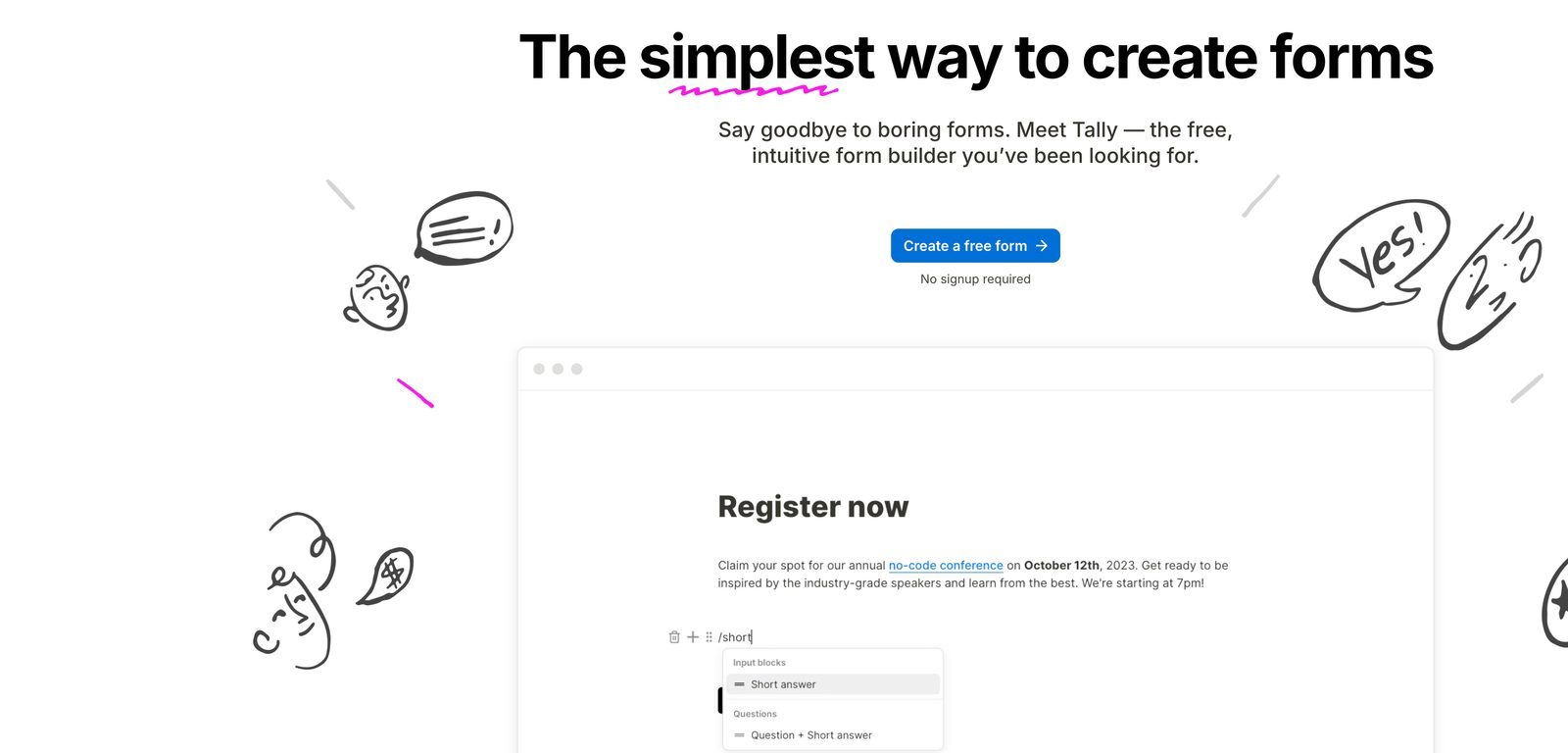
Tally is the go-to recommendation whenever someone asks “what is the best free Typeform alternative?” — and for good reason. It offers unlimited responses on the free plan, a clean conversational interface, and no artificial caps. For a product survey or internal feedback form, it is hard to beat.

Tally's document-style form builder interface with a slash-command menu
Tally's Notion-style form builder — clean and simple, with unlimited responses free.

The interface is often described as Google Docs meets Typeform. You build forms in a document-like editor, conditional logic works without heavy setup, and the resulting experience looks professional. The free plan includes custom domains, embedded forms, and basic integrations.

However, Tally’s free positioning tells you something about its limitations. There is no native calendar booking, no lead qualification logic beyond basic branching, and the CRM integration story relies primarily on webhooks and Zapier.

Who it’s for: Solopreneurs, indie developers, and small teams who need basic forms without paying Typeform prices. Not a fit for businesses running lead generation funnels that require qualification and booking.

JotForm logo4

JotForm — Feature-rich but cluttered experience

A comprehensive form builder with extensive features and integrations — but suffers from interface complexity and outdated UX.

Pros

  • Extensive feature set with 10,000+ templates
  • Generous free plan: 100 responses/month
  • Strong integration ecosystem with 150+ apps
  • Advanced conditional logic and calculations
  • Payment processing and e-commerce features

Cons

  • Cluttered interface feels outdated compared to modern alternatives
  • Complex feature set overwhelming for simple lead capture
  • No native calendar booking — requires third-party integrations
  • Forms can feel clunky and less engaging than Typeform
  • Limited modern design templates and customization
  • No built-in lead qualification or disqualification workflow

💰 Price: Free: 100 responses/month. Bronze $39/mo: 1,000 responses. Silver $49/mo: 2,500 responses.

JotForm is the Swiss Army knife of form builders — packed with features but lacking the elegant simplicity that made Typeform popular. With over 10,000 templates and extensive customization options, it can handle almost any form requirement. The interface complexity can be overwhelming, but the sheer breadth of features is genuinely impressive.

JotForm's drag-and-drop form builder, integrations, and payment collection UI
JotForm's drag-and-drop builder — feature-rich, with payments and 100+ integrations.

The free plan is notably more generous than Typeform: 100 responses per month with 5 forms. That is 10x Typeform’s free tier. Paid plans start at $39/mo for 1,000 responses, which is competitive with Typeform Plus at $79/mo for the same volume.

For lead generation, JotForm offers solid value with reasonable response limits and decent CRM integrations. However, the user experience feels dated, forms lack the engaging conversational flow that converts cold traffic, and you still need separate tools for calendar booking and lead qualification.

Who it’s for: Teams that need complex forms with payment collection, calculations, or file uploads. Not ideal for conversational lead capture where UX matters.

Google Forms logo5

Google Forms — Free but basic with no branding

Completely free form builder with unlimited responses — but lacks professional appearance and advanced features.

Pros

  • Completely free with unlimited form responses
  • Seamless integration with Google Workspace
  • Real-time collaboration and response tracking
  • Automatic data collection in Google Sheets

Cons

  • Basic, utilitarian design with limited customization
  • No branding options — forms clearly look like Google Forms
  • Limited question types and conditional logic
  • No calendar booking or appointment scheduling
  • Minimal CRM integration options
  • No conversion optimization features or analytics
  • Not suitable for professional lead generation campaigns

💰 Price: Completely free with unlimited responses.

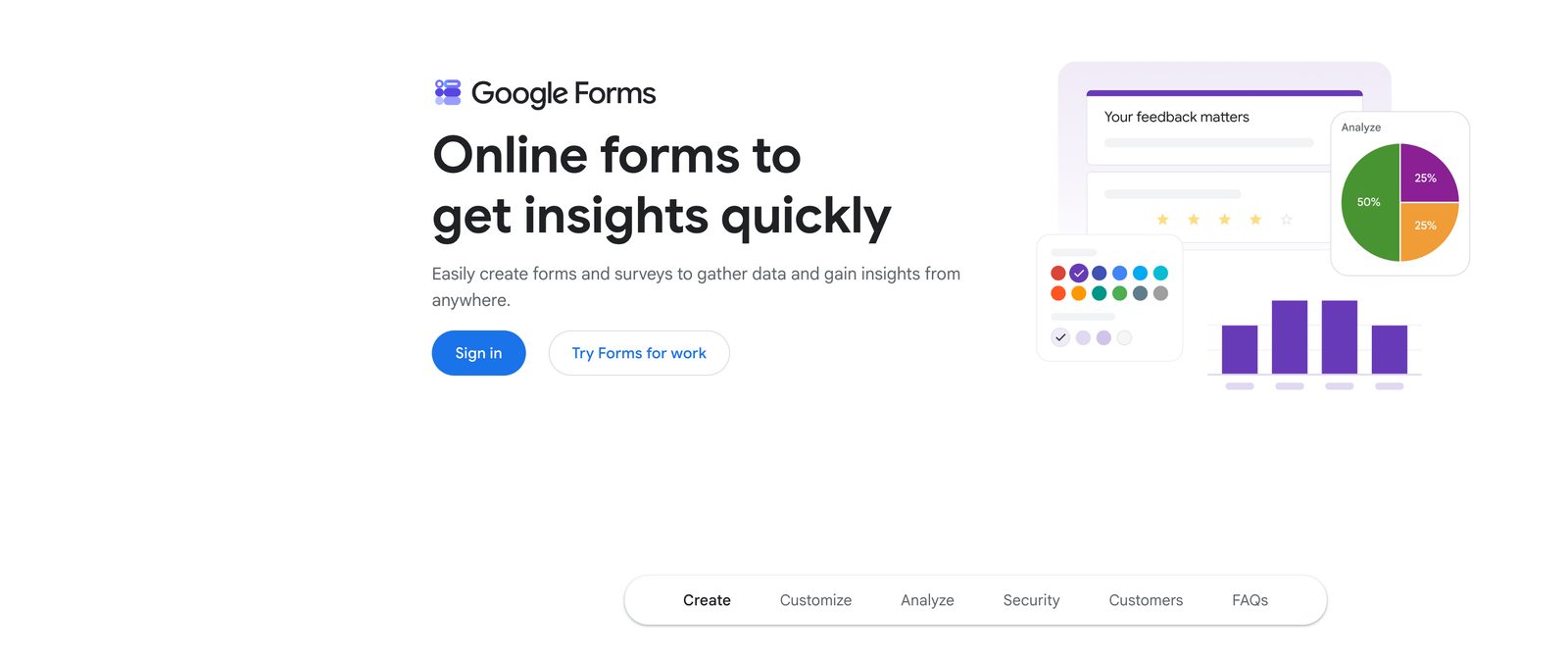
Google Forms is the nuclear option — completely free, unlimited responses, and backed by Google’s infrastructure. It is perfect for internal feedback, event registration, or simple data collection where brand perception and conversion optimization are not priorities.

Google Forms interface showing a survey with response charts and analytics
Google Forms — free and unlimited, but utilitarian and off-brand for lead gen.

For lead generation campaigns, Google Forms is a poor fit. The basic design signals “low budget” to prospects, which actively undermines premium positioning. There is no calendar integration, minimal CRM connectivity, and zero conversion optimization features.

Who it’s for: Internal team surveys, event RSVPs, and zero-budget data collection where brand presentation does not matter. Not suitable for customer-facing lead generation.

The verdict

The best Typeform alternative is ROASForm

Each alternative has its place. Tally for free basic forms with no response caps. JotForm for feature-heavy requirements where complexity is acceptable. Google Forms for zero-budget internal use. And Typeform itself when you need beautiful surveys and your volume is predictably low.

But for businesses that need to turn form traffic into qualified, booked calls, ROASForm is the clear choice. It is the only platform here that eliminates response limits, integrates calendar booking natively, and filters out tire-kickers before they consume your sales team’s time.

Head-to-head

Deep Dive: Typeform vs. ROASForm (Feature-by-Feature)

Now let’s do a detailed comparison between Typeform and ROASForm — breaking down response limits, tool integration complexity, and conversion features to see which platform actually delivers better ROI for lead generation.

Real cost

Typeform's Per-Response Stack vs. ROASForm's Flat Rate

Typeform charges more the more leads you generate — and you still need Calendly and Zapier bolted on. ROASForm is one flat plan, unlimited.

Feature
Typeform
ROASForm
Free Plan
10 responses/mo
50 submissions/mo, all features
Pricing Model
Per-response tiers — climbs as you grow
Flat rate — never climbs with volume
Paid Plan Submissions
Capped: 1,000 (Plus) to 10,000 (Business)
Unlimited ($99/mo flat)
When Limit Is Reached
Forms close immediately, leads lost
No caps on paid plans
Calendar Booking
Requires Calendly + Zapier setup
Integrated (no separate tools needed)
Lead Qualification
No qualification — captures everyone
Built-in disqualification logic
CRM Integration
300+ integrations (mostly Zapier-dependent)
GoHighLevel, Close, HubSpot & major CRMs
A/B / Split Testing
Not available natively — manual workarounds
Built-in on every plan
Drop-off Analytics
Business plan only ($129/mo)
Included on all plans
Form Experience
Beautiful conversational UI
4 high-converting skins
Setup Complexity
Typeform + Calendly + Zapier required
All-in-one solution

We've done our best to ensure all information provided on this page is accurate. If you see any incorrect, incomplete, or inaccurate information, please request correction.

Typeform stack

$110–175/mo(Plus/Business + Calendly + Zapier — and climbing)
Response caps are shared across ALL your forms. Hit the cap and your forms close cold — no grace period, and the leads you paid for are gone.
  • Typeform: $79/mo (1,000 responses) → $129/mo (10,000) → keeps climbing
  • Calendly (~$16/mo) required for booking — no native scheduler
  • Zapier (~$29/mo) required to push leads into your CRM
  • No native lead qualification and no native A/B testing

Save $600+/year vs a Typeform + Calendly + Zapier stack

Best value
ROASForm
$99/mo(flat · unlimited submissions)
One flat plan replaces Typeform + Calendly + Zapier — and the price never climbs, whether you collect 500 leads or 50,000.
  • Unlimited submissions — never hit a cap or lose a lead
  • Built-in calendar booking — no separate scheduler required
  • Built-in qualification: filter out tire-kickers automatically
  • Syncs with GoHighLevel, Close, HubSpot & major CRMs

The verdict

A real Typeform lead-gen stack (Typeform + Calendly + Zapier) runs $110-175/mo and climbs every time you cross a response tier. ROASForm delivers unlimited submissions, integrated booking, and lead qualification for a flat $99/mo.

Side-by-side comparison

Typeform Alternatives: Pricing, Limits & Features Compared

Here is a direct comparison of each alternative across the factors that matter most for lead generation: price, response limits, calendar booking, CRM sync, and lead qualification.

ToolPriceResponse LimitCalendar BookingCRM SyncLead Qualification
ROASFormFree — $99/mo flatUnlimited (paid)✅ Built-in✅ GHL, Close, HubSpot✅ Built-in
Typeform$39–$129/mo100–10,000/mo cap❌ Requires Calendly⚠️ Mostly via Zapier❌ None
TallyFree — $29/moUnlimited (free)❌ No native booking⚠️ Via Zapier❌ None
JotFormFree — $49+/mo100–2,500/mo❌ No native booking⚠️ Via Zapier❌ None
Google FormsFreeUnlimited❌ None❌ None❌ None

The table makes the tradeoffs clear. Only ROASForm has built-in calendar booking, direct CRM sync (GoHighLevel, Close, HubSpot), and lead qualification logic. Every other tool in this list requires you to bolt on separate services — which means more monthly cost, more Zapier automations to maintain, and more points of failure in your lead gen funnel.

Tally and Google Forms solve the response limit problem, but they replace one gap (cost) with another (missing features). JotForm offers better value than Typeform on response volume, but shares the same integration gaps.

Try ROASForm Free

No credit card required — start free with 50 submissions/mo

Final verdict

The Best Typeform Alternative for 2026: What You Need to Know

Typeform is a genuinely well-designed product. The conversational form experience is polished, and for low-volume surveys or research panels, it earns its price tag. But for businesses using forms as a lead generation tool, the pricing model is a trap.

Here is what Typeform actually costs at each usage level in 2026:

  • 0–10 responses/mo: Free — but you will exhaust this in days if you run any meaningful traffic.
  • 11–100 responses/mo: $39/mo Basic. One busy week on a single lead form will blow through this.
  • 101–1,000 responses/mo: $79/mo Plus. This is the minimum for any real lead generation campaign.
  • 1,001–10,000 responses/mo: $129/mo Business. Add Calendly ($16/mo) and Zapier ($29/mo) and you are at ~$174/mo for a complete lead gen setup.
  • 10,000+ responses/mo: Enterprise (custom pricing). At this volume, a per-response model is genuinely punishing.

By contrast, ROASForm is a flat $99/mo for unlimited submissions at every one of those volume levels — with calendar booking and lead qualification already included — no separate scheduler or Zapier automation to bolt on.

The real trap is the hard wall. Unlike usage-based pricing that scales gracefully, Typeform cuts you off entirely when you hit the cap. No warning countdown. No grace period. Your forms close, and the leads you paid to acquire never get recorded.

For specific use cases, here is who wins:

  • Tally — Best free Typeform alternative for basic forms with unlimited responses. Good for solopreneurs and simple data collection.
  • JotForm — Better value than Typeform for feature-heavy forms (payments, calculations, file uploads) with higher response limits at lower prices.
  • Google Forms — Zero-budget internal use only. Not for customer-facing lead generation.
  • Typeform — Only when you specifically need beautiful survey UX with predictable, low volume.

But for lead generation and business growth, ROASForm is the clear choice. Instead of paying per response while managing multiple tools, you get unlimited submissions, integrated calendar booking, and lead qualification in one platform designed to convert visitors into qualified, booked calls.

There is no response cap that will shut down your forms mid-campaign. There is no Zapier automation that can break. There is no separate scheduler subscription to add on top — booking is built right into the form flow. Just a single system built specifically for the outcome that matters: qualified prospects on your sales calendar.

Clear winner for lead generation

ROASForm

Unlimited responses, integrated booking, and qualification logic designed for conversion — not just collection. Turn the traffic you already pay for into qualified, booked calls.

Free Forever plan • No credit card required

Frequently Asked Questions

Everything you need to know before getting started.

Next step

Turn Paid Traffic Into Qualified, Booked Calls

ROASForm captures, qualifies, and books every lead in one flat-rate platform — unlimited submissions, built-in calendar booking, and native CRM sync. No response caps that shut your forms down, and no separate scheduler to bolt on.

  • Free Forever plan: 50 submissions/mo with every feature
  • Unlimited submissions on a flat $99/mo
  • Built-in calendar booking + native CRM sync — no separate scheduler needed

No credit card required on the free plan.