- Published on
Jotform vs Typeform: Complete 2025 Comparison (+ The Free Unlimited Alternative)
- Authors

- Name
- Jovan Stojanovic
Picking between Jotform and Typeform can be a bit of a headache, especially if you're just trying to get a form up and running without a lot of fuss. Both are popular, and each has its own way of handling things. Jotform has loads of templates and integrations, while Typeform is all about smooth, good-looking forms that people actually want to fill out.
But here's the reality: both platforms hit you with strict limits and monthly fees that add up fast. If you're stuck on which one to use in 2025, you're not alone. This article will break down Jotform vs Typeform, diving deep into their pricing, features, and what it's actually like to use them day-to-day—plus introduce ROASForm, which gives you the best of both worlds without the subscription costs.
💡 Quick Answer
If you need a quick decision: Typeform for beautiful UX (if budget allows), Jotform for flexibility and integrations, or
ROASForm
for unlimited everything at $0/month.
Keep reading for the full breakdown with screenshots, pricing details, and feature comparisons.
Overview of Jotform and Typeform
Before we dive into the nitty-gritty details, let's understand what these platforms are all about and who they're designed for.
What is Typeform?
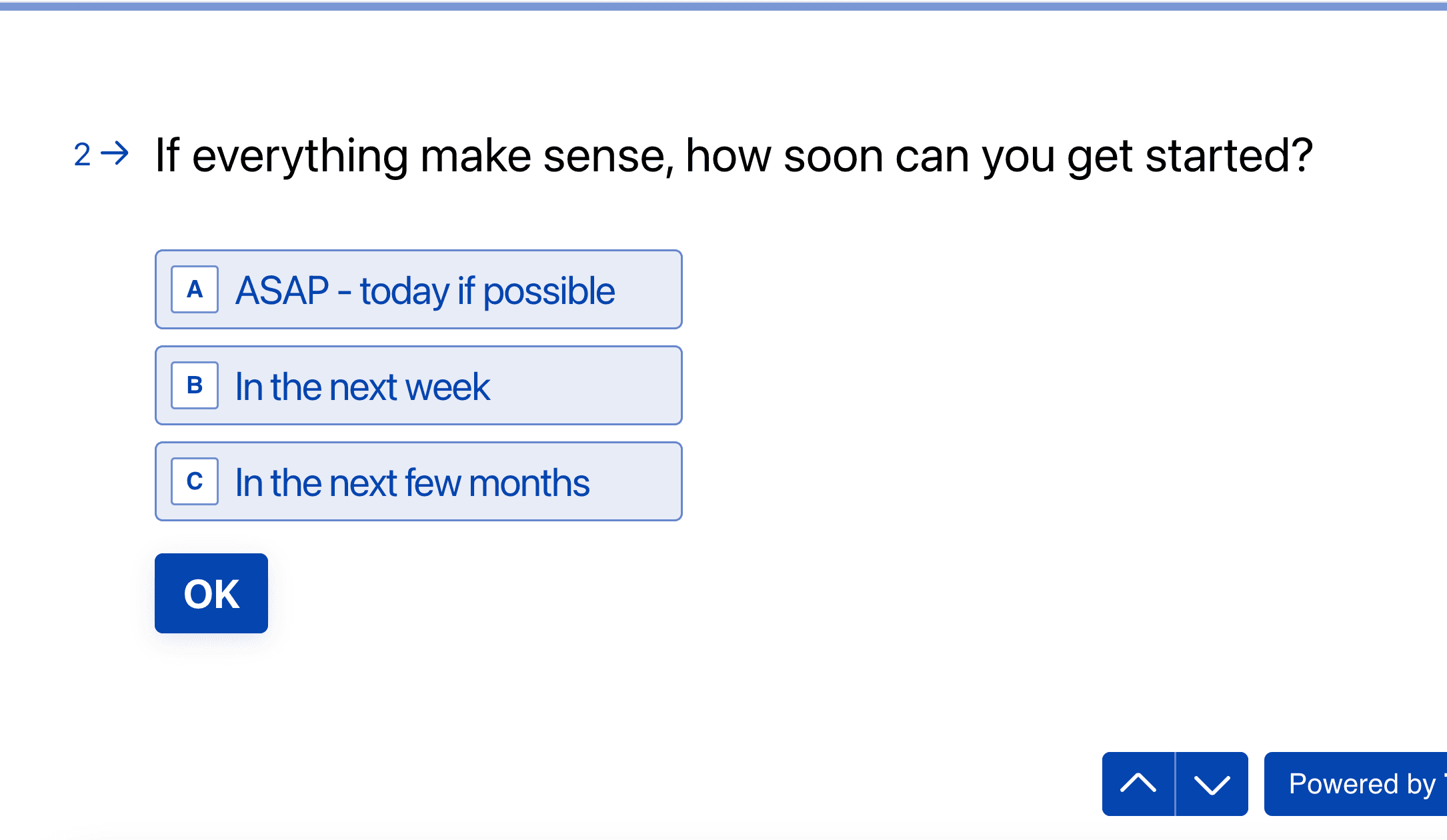 Typeform's signature one-question-at-a-time interface
Typeform launched in 2012 with a simple mission: make forms feel more like conversations. Instead of overwhelming users with a wall of questions, Typeform shows one question at a time, creating a more engaging experience.
Best for:
- Marketing teams who prioritize aesthetics
- Surveys and feedback forms where completion rate matters
- Brands that want a modern, polished look
- Simple use cases with straightforward forms
Watch: Quick Typeform Tutorial
How to create your first Typeform
What is Jotform?
 Jotform's comprehensive form builder dashboard
Jotform has been around since 2006 and takes a different approach. It's the Swiss Army knife of form builders—packed with features, templates, widgets, and integrations for virtually any use case imaginable.
Best for:
- Businesses needing complex forms with conditional logic
- Industries requiring HIPAA compliance or advanced security
- Teams that need extensive integration options (400+)
- Power users who want full customization control
Watch: Jotform Complete Guide
Complete Jotform walkthrough
What is ROASForm?
ROASForm takes a completely different approach: no artificial limits, no monthly subscriptions. You get the flexibility to switch between Typeform-style conversational forms and Jotform-style robust builders—all in one platform, completely free.
Best for:
- Startups and small businesses watching their budget
- Agencies managing multiple clients
- Anyone tired of hitting form/submission caps
- Users who want both Typeform UX and Jotform power
Key Features Comparison
Let's break down how these platforms actually compare when you're building and using forms day-to-day.
Form Builder Interface
Typeform's Approach
 Typeform's clean, minimalist form builder
Typeform's builder is intentionally simple. You add questions one at a time, customize the design, and preview how it feels. There's not a ton of clutter—which is great if you want to get something up fast, but limiting if you need complex workflows.
Pros:
- ✅ Super intuitive, even for beginners
- ✅ Live preview as you build
- ✅ Beautiful default templates
- ✅ Logic jumps are easy to set up
Cons:
- ❌ Limited customization beyond themes
- ❌ Can't see full form structure at once
- ❌ Fewer field types than competitors
Jotform's Approach
 Jotform's feature-rich drag-and-drop builder
Jotform gives you a traditional drag-and-drop form builder with a full view of your entire form. You can see all fields at once, rearrange them easily, and access hundreds of widgets for everything from signatures to payment processing.
Pros:
- ✅ See entire form layout at once
- ✅ Drag-and-drop is very responsive
- ✅ Massive widget library (100+)
- ✅ Advanced conditional logic
- ✅ Can insert custom CSS/HTML
Cons:
- ❌ Can feel overwhelming at first
- ❌ So many options it's easy to get lost
- ❌ Interface feels dated compared to Typeform
ROASForm's Approach
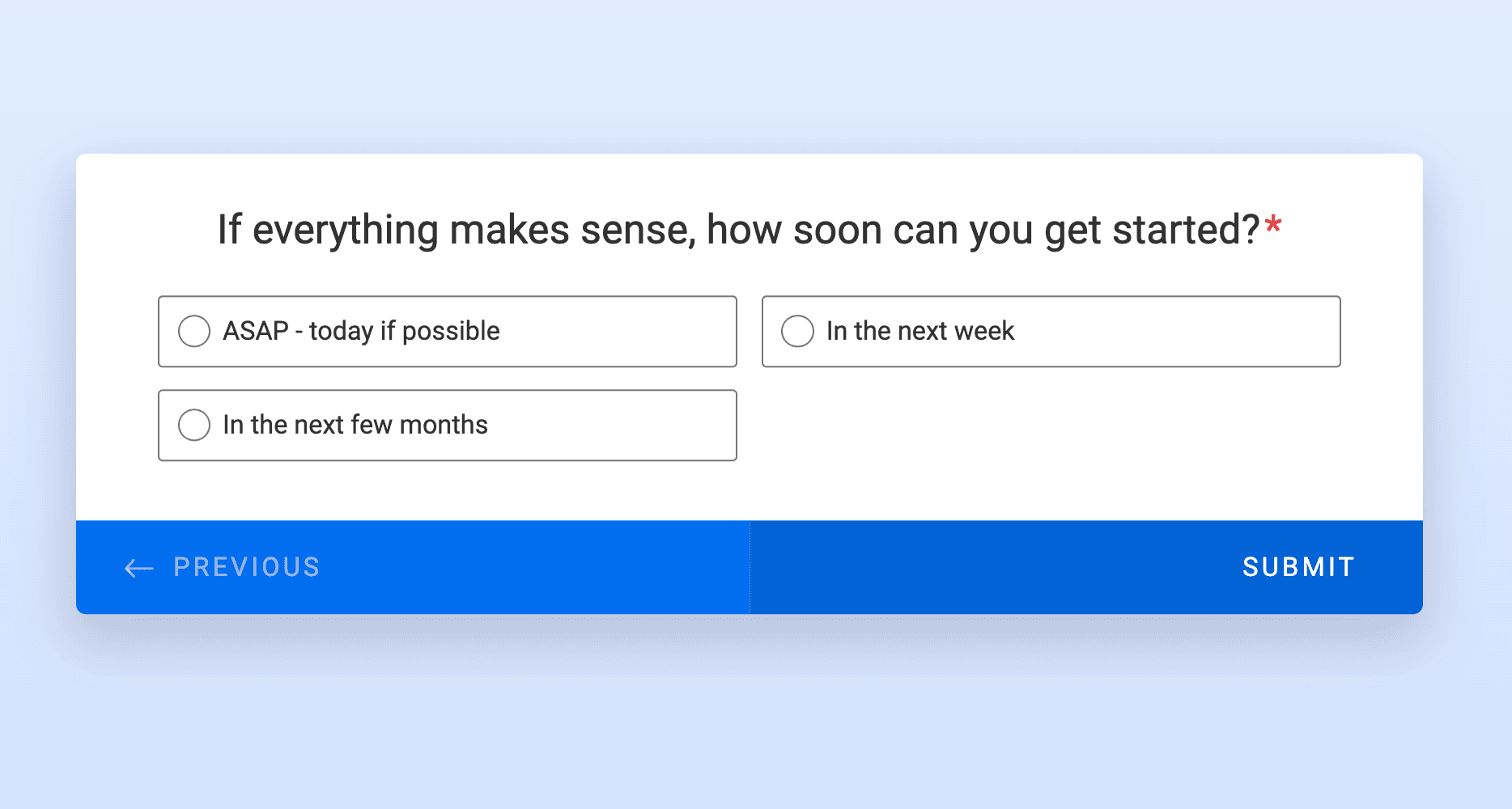
 ROASForm's flexible dual-mode form builder
ROASForm lets you switch between both styles depending on your needs:
- Typeform Mode: For surveys, feedback, and conversational forms
- Jotform Mode: For complex registration, orders, and data collection
- Hybrid Mode: Mix and match elements from both
🎯 Pro Tip
Use Typeform-style for customer feedback (better completion rates) and Jotform-style for lead generation forms (capture more data). With
ROASForm
, you don't have to choose—switch on the fly!
Templates and Customization
| Feature | Typeform | Jotform | ROASForm |
|---|---|---|---|
| Templates | ~100 polished templates | 10,000+ templates | Access to both libraries |
| Custom CSS | ❌ No (Plus plan only) | ✅ Yes (all paid plans) | ✅ Yes (free) |
| Remove Branding | $59/month (Plus) | $34/month (Bronze) | ✅ Free during beta |
| Custom Fonts | Limited selection | Google Fonts | Google Fonts + custom |
| Themes | 18 themes | Unlimited custom | Unlimited |
Integrations and Add-ons
Jotform wins on quantity with 400+ native integrations, including:
- Payment processors: PayPal, Stripe, Square, Authorize.net
- CRMs: Salesforce, HubSpot, Zoho, Pipedrive
- Email marketing: Mailchimp, ActiveCampaign, ConvertKit
- Project management: Asana, Trello, Monday.com
- Cloud storage: Google Drive, Dropbox, OneDrive
Typeform focuses on quality with ~150 integrations, emphasizing:
- Marketing & sales tools: HubSpot, Salesforce, Marketo
- Communication: Slack, Microsoft Teams, Discord
- Analytics: Google Analytics, Mixpanel, Amplitude
- Automation: Zapier, Make (Integromat), n8n
ROASForm includes the essentials:
- Core CRM integrations (HubSpot, Salesforce, Pipedrive)
- Payment processing (Stripe, PayPal)
- Email platforms (Mailchimp, SendGrid)
- Webhooks for custom integrations
- API access for advanced users
⚠️ Reality Check
Most users only need 5-10 integrations. Jotform's 400+ integrations look impressive, but if you're paying $99/month and only using Stripe + Mailchimp, you're overpaying for features you'll never touch.
Pricing and Plans: The Hidden Costs
This is where things get interesting—and expensive. Both platforms use pricing to push you toward paid plans, but the way they limit you differs dramatically.
The Real Cost Comparison
Let's say you need to collect 2,000 form responses per month across multiple forms:
| Platform | Plan Needed | Monthly Cost | Annual Cost | Major Limitations |
|---|---|---|---|---|
| Typeform | Plus | $59 | $708 | 3 users max, branded until Plus tier |
| Jotform | Silver | $39 | $468 | 100 forms max, 25 payment submissions |
| ROASForm | Free | $0 | $0 | None |
3-Year Total Cost:
- Typeform: $2,124 💸
- Jotform: $1,404 💰
- ROASForm: $0 🎉
Typeform Pricing Breakdown
 Typeform's pricing tiers and limitations
FREE Plan - The "Basically Unusable" Tier
- 10 responses per month — Seriously, just 10. That's not even a week's worth of data for most businesses.
- Unlimited typeforms
- Unlimited questions
- Typeform branding stays — No way to remove it
- Basic features only
Reality check: This is basically a demo. You can't run any real business or project on 10 responses per month. You'll hit this limit in hours if you share your form publicly.
Basic Plan - $29/month
- 100 responses per month — Still extremely limiting
- 1 user
- Unlimited typeforms
- Unlimited questions
- Still can't remove Typeform branding 😤
- No custom subdomain
The problem: You're paying 0.29 per response** if you max it out.
🚨 Hidden Cost Alert
Typeform charges per response RECEIVED, not per form. If you have 5 forms and hit 20 responses each, you've used 100 responses—your entire Basic plan limit.
Miss this detail and you'll wonder why your forms stopped working mid-campaign.
Plus Plan - $59/month
- 1,000 responses per month
- 3 users
- Finally remove Typeform branding 🎊
- Custom subdomain
- Better integrations
- Priority support
The catch: You need to pay 708/year**.
Business Plan - $99/month
- 10,000 responses per month
- 5 users
- Priority support
- Drop-off rates and conversion tracking
- Custom branding
The price tag: $1,188/year, and you still have caps. Need more than 10,000 responses? Time to talk to sales for Enterprise pricing (spoiler: it's expensive).
Jotform Pricing Breakdown
 Jotform's confusing tier system with multiple limits
Jotform's pricing is more complex because they limit you in multiple ways: number of forms, submissions, storage, form views, AND payment submissions. It gets confusing fast.
Starter Plan (FREE) - "The 5-Form Wall"
- 5 forms maximum — You can only have 5 forms active at once
- 100 submissions per month — Better than Typeform, but still limiting
- 100 fields per form
- 1,000 form views per month
- 500 total submission storage
- 100MB upload space
- 10 payment submissions per month
- 10 signed documents per month
- Jotform branding included — Can't be removed
The limitation: Even though you get more submissions than Typeform's free plan, you can only create 5 forms total. Need a contact form, order form, survey, registration form, feedback form, and application form? That's 6 forms—time to upgrade.
Bronze Plan - $34/month
- 25 forms — Still limiting if you have multiple projects
- 1,000 monthly submissions
- 1GB storage
- 10,000 form views/month
- 10,000 submission storage
- 100 fields per form
- Remove Jotform branding ✨
- 10 payment submissions/month
- 10 signed documents/month
The catch: You're paying $34/month but still limited to 25 forms and 1,000 submissions. Plus, only 10 payment submissions means this isn't great for e-commerce.
Silver Plan - $39/month
- 100 forms
- 2,500 monthly submissions
- 10GB storage
- 100,000 form views/month
- 100,000 submission storage
- 1,000 fields per form
- 25 payment submissions/month
- 25 signed documents/month
Still limiting: Even at this price point, you're capped at 100 forms and 2,500 submissions. For agencies managing multiple clients, this isn't enough.
Gold Plan - $99/month
- Unlimited forms — Finally! 🎉
- 10,000 monthly submissions
- 100GB storage
- 1,000,000 form views/month
- Unlimited submission storage
- 10,000 fields per form
- HIPAA compliance available
- 100 payment submissions/month
- 100 signed documents/month
The reality: You need to pay **1,188/year minimum. And you're still capped at 10,000 submissions.
What About Removing Branding?
This is where both platforms really get you:
| Platform | Cost to Remove Branding | What You Get |
|---|---|---|
| Typeform | $59/month (Plus plan) | Logo removal, 1,000 responses |
| Jotform | $34/month (Bronze plan) | Logo removal, 25 forms, 1,000 submissions |
| ROASForm | FREE (during beta) | Complete white-labeling |
Professional tip: If you're sending forms to clients or customers, having another company's logo on YOUR form looks unprofessional. Both Typeform and Jotform know this and charge accordingly.
ROASForm Pricing: Refreshingly Simple
Here's where things get interesting. ROASForm throws out the traditional pricing model entirely:
FREE Plan - $0/month (Yes, Really)
What You Get (Actually Free):
- ✅
Unlimited forms — Create as many as you need
- ✅
Unlimited submissions* — No monthly caps
- ✅
Unlimited questions per form — Build complex forms without restrictions
- ✅
Switch between Typeform and Jotform styles — Get both interfaces in one platform
- ✅
Remove branding — White-label your forms (currently free during beta)
- ✅
No hidden limits — No form view caps, no field limits, no submission storage caps
- ✅
Core integrations included — Connect with popular tools
- ✅
Payment collection — Accept payments without per-transaction limits
*Fair use policy: Unlimited submissions refers to approximately 10,000 submissions per month for standard business use.
No asterisks. No "upgrade to unlock." No artificial scarcity.
User Experience and Ease of Use
Let's talk about what it's actually like to use these platforms every day.
Getting Started (First 30 Minutes)
Typeform: You'll be impressed. The onboarding is smooth, templates are beautiful, and you can have a working form in under 5 minutes. The interface is so intuitive that you barely need to think about it.
Jotform: There's a learning curve. The dashboard has lots of tabs and options. You'll spend time exploring widgets and templates. Once you're comfortable (maybe 30-60 minutes), you'll appreciate the flexibility.
ROASForm: Choose your starting mode (Typeform-style or Jotform-style) and go. The dual-interface approach means you can start simple and add complexity as needed.
Daily Usage Experience
Typeform's Strengths:
- Changes save automatically
- Collaboration is seamless
- Previewing your form is instant
- The "share" experience is delightful
Typeform's Frustrations:
- No bulk editing (have to edit questions one by one)
- Can't duplicate conditional logic between questions
- Limited export options for data
- Customer support is slow unless you're on Enterprise
Jotform's Strengths:
- Powerful form builder with every option imaginable
- Excellent for complex workflows
- Great data management tools
- Responsive customer support even on free plan
Jotform's Frustrations:
- Interface can feel cluttered and overwhelming
- So many features you'll never use
- Mobile form builder is awkward
- Some integrations require paid plans
Security and Data Privacy
When it comes to form builders, privacy isn't just a buzzword—it's a real concern, especially if you're collecting sensitive information.
Compliance and Certifications
| Feature | Typeform | Jotform | ROASForm |
|---|---|---|---|
| GDPR Compliant | ✅ Yes | ✅ Yes | ✅ Yes |
| SSL Encryption | ✅ Yes | ✅ Yes | ✅ Yes |
| HIPAA Compliance | ❌ Limited (Enterprise only) | ✅ Yes (Gold plan, $99/mo) | 🔄 On roadmap |
| SOC 2 Type II | ✅ Yes | ✅ Yes | 🔄 In progress |
| Data Centers | EU, US | Multiple worldwide | US, EU |
| Data Deletion | Self-service | Self-service | Self-service |
Jotform stands out with its advanced compliance options, especially for industries handling sensitive data. It supports HIPAA compliance (with its Gold and Enterprise tiers at $99+/month) and provides SSL encryption for all submissions.
Typeform also prioritizes safety, using SSL encryption by default and following GDPR requirements for users in the EU. However, its HIPAA support isn't as thorough or widely available as Jotform's.
ROASForm uses SSL encryption for all form submissions and follows GDPR best practices. While advanced compliance features like HIPAA are on the roadmap, the platform provides solid security for most business and marketing use cases—without charging you $99/month for the basics.
🔒 Security Tip
If you're in healthcare or handling medical data, you NEED HIPAA compliance. That means Jotform Gold ($99/mo) minimum. For everyone else (marketing, sales, HR), standard SSL encryption is plenty.
Which is Better for Your Needs?
Deciding between Jotform and Typeform isn't as simple as picking the one with the most features (or the lowest price tag). It comes down to what matters most for your workflow and goals.
Choose Typeform if:
✅ Visual design and user experience are your absolute top priorities
- You're in marketing/branding and aesthetics matter
- Form completion rates are critical to your business
- You want forms that feel modern and polished
✅ You have simple, straightforward form needs
- Surveys and feedback forms
- Event registrations
- Lead capture forms
- Quizzes and assessments
✅ You can afford $59-99/month
- Budget isn't a major constraint
- You value their specific ecosystem
- You need their Growth or Talent plan features
✅ You specifically need their advanced features
- Video questions
- AI-powered insights
- Advanced logic jumps with beautiful UX
Bottom line: Typeform is like the iPhone of form builders—beautiful, intuitive, premium-priced, and you're paying for the brand and experience.
Choose Jotform if:
✅ You need advanced HIPAA compliance
- Healthcare, medical, or therapy businesses
- Gold plan ($99/month) required
- You're okay paying for specialized compliance
✅ You want the absolute widest range of integrations (400+)
- You have niche integrations that only Jotform supports
- You need their specific widget ecosystem
- Complex workflows with multiple connected tools
✅ Budget isn't a constraint
- You value their specific features enough to pay $34-99/month
- You're an established business with form budget allocated
- You need their enterprise features
✅ You need their specific advanced features
- Electronic signatures with advanced workflows
- Complex conditional logic
- Extensive form widgets and plugins
Bottom line: Jotform is like the Android of form builders—more features, more flexibility, more complexity, and you get what you pay for.
Choose ROASForm if:
✅ You want both Jotform AND Typeform capabilities in one platform
- Switch between conversational (Typeform) and robust (Jotform) styles
- Don't want to commit to a single approach
- Need flexibility for different form types
✅ You're tired of artificial limitations and subscription costs
- Hitting form/submission caps frustrates you
- $29-99/month feels like paying for artificial scarcity
- You value unlimited usage
✅ You need unlimited forms and submissions without paying hundreds per year
- Startup or small business watching every dollar
- Agency managing multiple clients
- Freelancer needing professional tools
✅ You want to remove branding without paying extra
- Professional presentation matters
- White-label solution during beta (free)
- No "Powered by" logos on your forms
✅ You're a startup, small business, agency, or freelancer watching your budget
- Every $30-100/month matters to your runway
- You need enterprise features without enterprise pricing
- You want tools that scale with you, not against you
✅ You value flexibility over platform lock-in
- No contracts or commitments
- Export your data anytime
- Switch features without upgrade friction
Bottom line: ROASForm is like getting both the iPhone AND Android experience without paying monthly for either—plus unlimited everything.
Key Takeaways
After diving deep into both platforms, here's what you need to remember:
📝 Quick Summary
Typeform's free plan allows only 10 responses per month. Jotform gives you 100 submissions but limits you to just 5 forms. Both are designed to push you toward paid plans.
Jotform has more templates (10,000+) and integration options (400+). Typeform focuses on a clean, interactive UX with one-question-at-a-time layouts.
Typeform requires Plus plan (34/month).
ROASForm
lets you remove branding for free during beta.
eliminates limitations entirely: unlimited forms, unlimited submissions, unlimited questions, plus the ability to switch between Typeform and Jotform styles—all for free.
Pay $468-708/year for artificial restrictions and monthly stress about hitting caps, or use
ROASForm
and never worry about limits again.
Conclusion
So, after spending way too much time tinkering with Jotform, Typeform, and ROASForm, here's the honest truth:
Neither Jotform nor Typeform is a clear winner for everyone.
Jotform is like that reliable toolbox in your garage—tons of templates, lots of integrations, and you can really dig into customization if you want. It's great if you need forms for all sorts of things and don't mind poking around with settings. But you'll pay $34-99/month and still hit form or submission limits depending on your plan.
Typeform is more like a shiny new gadget—super easy to use, looks great, and your forms end up feeling more like a conversation than a boring survey. It's perfect if you care about how your forms look and want people to actually enjoy filling them out. But the free plan is basically unusable (10 responses/month), and you'll need to shell out $59/month just to remove their branding.
But here's the thing: ROASForm basically says "why choose?"
You get the Jotform-style builder when you need power and flexibility, and the Typeform-style interface when you want something sleek and conversational. And you get unlimited forms, unlimited submissions, and unlimited questions—all for free.
No subscription fatigue. No hitting caps at the worst possible moment. No choosing between features and budget.
The question isn't "Jotform or Typeform?" anymore.
The question is: Why pay monthly for artificial restrictions when you can have unlimited everything for free?
Frequently Asked Questions
What is the main difference between Jotform and Typeform?
Jotform is known for its huge library of templates and lots of ways to customize your forms. Typeform stands out for its simple, one-question-at-a-time style, which makes forms look more friendly and keeps people interested. ROASForm combines both approaches—you can switch between the two styles depending on your needs, all in one platform.
Which tool is easier for beginners to use?
Typeform has a very clean and easy-to-understand interface, so it's great for people new to building forms. Jotform is also user-friendly but has more features, which might take a little longer to learn. ROASForm offers the simplicity of Typeform with the option to access Jotform-style features as you grow more comfortable—and you never hit the 10-response wall that Typeform's free plan has.
Can I collect payments through these platforms?
Yes, all three platforms let you add payment options to your forms. Jotform connects with more payment services, but limits you to just 10 payment submissions per month on the Bronze plan ($34/month). Typeform supports payments but with response limits. ROASForm supports payment collection through popular processors without artificial per-transaction limits.
How do the free plans really compare?
- Typeform Free: 10 responses per month, unlimited forms, unlimited questions, but you can't remove Typeform branding. Basically unusable for real projects.
- Jotform Free: 100 submissions per month, but only 5 forms maximum, can't remove Jotform branding. Better than Typeform but still very limiting.
- ROASForm Free: Unlimited forms, unlimited submissions*, unlimited questions, can remove branding (currently free during beta). Actually free without the catches.
What does it cost to remove branding?
- Typeform: Must upgrade to Plus plan at $59/month
- Jotform: Must upgrade to Bronze plan at $34/month minimum
- ROASForm: Free during beta (and the free plan will always remain free)
Are my form responses secure with these platforms?
All three platforms use strong security like SSL encryption to keep your data safe. Jotform offers extra security features like HIPAA compliance, but only on Gold plan ($99/month) or higher. Typeform offers limited HIPAA on Enterprise plans. ROASForm uses SSL encryption and follows GDPR best practices, with advanced compliance features being added based on user needs—all on the free platform.
What if I can't decide between Jotform and Typeform?
That's exactly why ROASForm exists. You don't have to choose—you can switch between Typeform-style conversational forms and Jotform-style robust builders whenever you want, all within the same platform. Plus, with unlimited forms and submissions, you can experiment freely without worrying about hitting usage limits or paying $29-99/month for multiple subscriptions.
Is there a catch with ROASForm being free?
No catch. No credit card required. No "free trial" that converts to paid. ROASForm is built on a different model—we believe form builders should help you succeed, not profit from artificial scarcity. The platform is currently free during beta, with all core features included. Features like custom branding removal are free now during beta, though some advanced features may have pricing in the future. But even then, the free plan will still always be free with unlimited forms and submissions.
*Fair use policy: Unlimited submissions refers to approximately 10,000 submissions per month for standard business use. This generous limit ensures the platform remains fast and reliable for all users while providing more than enough capacity for most businesses without the artificial caps of other platforms.
Ready to try ROASForm?
Get unlimited forms, unlimited submissions, and choose between Typeform and Jotform styles—all for free.
Start Building Forms for Free →
No credit card required • Unlimited forms • Unlimited submissions